Save any video in one click

ClipStudio Downloader saves videos from YouTube, TikTok and Instagram to your laptop, in the quality you choose, or just the sound as MP3.

Windows 10 / 11 · small installer (85 KB) · it downloads the rest (about 250 MB) while installing

You look like you are not on Windows. ClipStudio Downloader works on Windows laptops only for now.
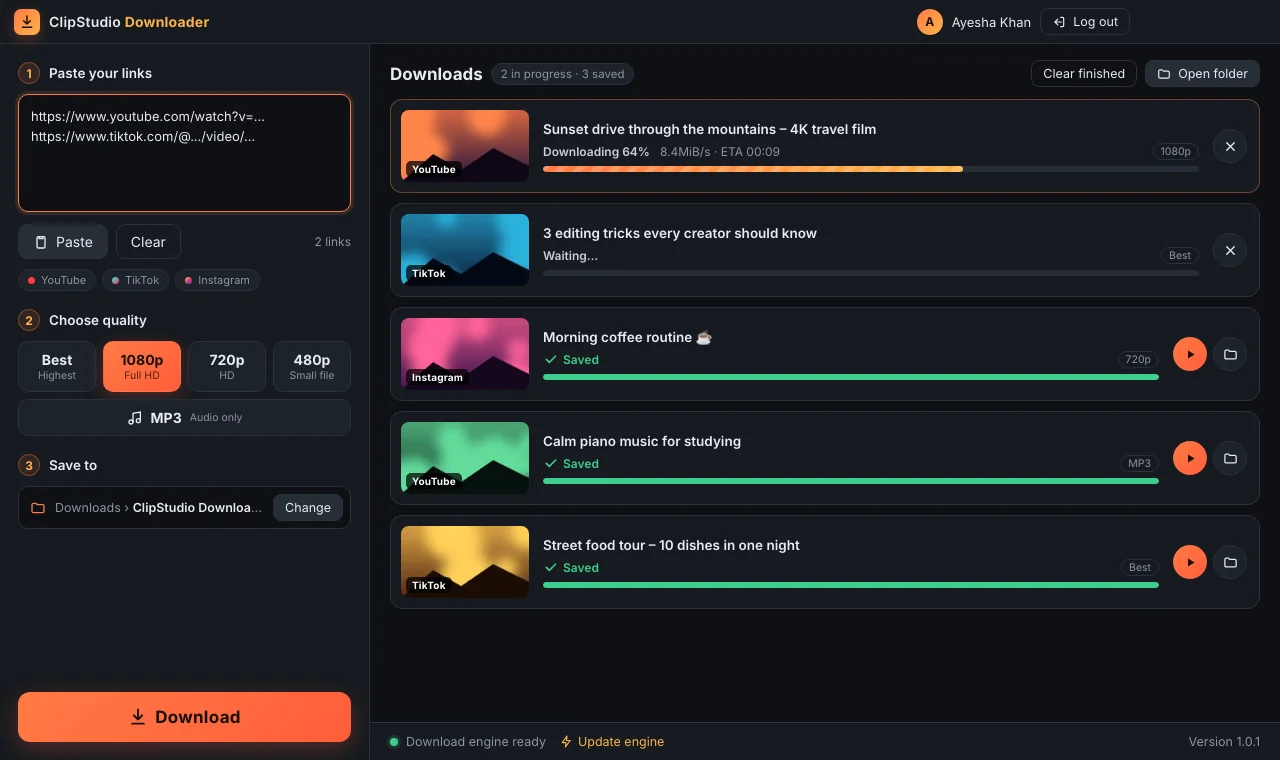
ClipStudio Downloader with several videos downloading and saved

Simple, fast, made for creators

Paste a link, pick a quality, done.

🔗

Many links at once

Paste several links, one per line, and press Download once. They are saved one after another.

🎞

Choose the quality

Best, 1080p Full HD, 720p or a small 480p file. Videos are saved as MP4 so they open everywhere.

🎵

MP3 audio

Only need the sound or music? Choose MP3 and get just the audio.

📊

See every download

Thumbnail, title, live progress, speed and time left. Play the video or open its folder in one click.

⚡

Updates itself

The download engine checks for updates every day, so it keeps working when the websites change.

🔐

Your ClipStudio account

Create your account right in the app, or use your ClipStudio email and password. One computer at a time.

Install in a few minutes

No technical skills needed.

Download

Click Download for Windows above and save the file.

Extract

Right-click the downloaded zip and choose Extract All, then Extract.

Install

Open the folder and double-click Install ClipStudio Downloader. Keep the black window open for 2–5 minutes.

Log in

The app opens by itself. New? Choose Create account. After your teacher approves you, log in. Next time, use the Desktop icon.

New here?

Open the app and choose Create account. Your teacher approves it, then you can use ClipStudio and the Downloader with the same account.

Also try the ClipStudio editor

Edit your downloaded videos with cuts, filters, glow, speed and more, right on your laptop.

See the editor

Questions

Quick answers before you install.

Windows says "Windows protected your PC". Is it safe?

This message appears for any new app that isn't from a large publisher. Click More info, then Run anyway.

Which websites does it work with?

YouTube, TikTok and Instagram. Private videos, private Instagram posts and some age-restricted videos can't be downloaded.

Is it the same account as ClipStudio?

Yes. Use the same email and password. If you don't have an account yet, choose Create account in the app and wait for your teacher to approve it.

Can I use my account on two computers?

One computer is active at a time. If you log in on another computer, the first one is logged out automatically.

Where are my videos saved?

In Downloads › ClipStudio Downloader. You can choose another folder in the app with Change, and open it with Open folder.

A download failed. What should I do?

Check the link opens in your browser, then press the retry button. If YouTube downloads stop working, click Update engine at the bottom of the app.

How do I update to a new version?

Download the Setup from this page again and run it. It replaces the old version and you stay logged in.

How do I remove it?

Windows Settings › Apps, find ClipStudio Downloader and choose Uninstall. Your downloaded videos are kept.

Can I download anything I want?

Only download videos you made yourself or have permission to use, and follow each website's rules.
Ready to save your first video?

Download ClipStudio Downloader, create your account in the app and start saving videos.

⬇ Download for Windows